
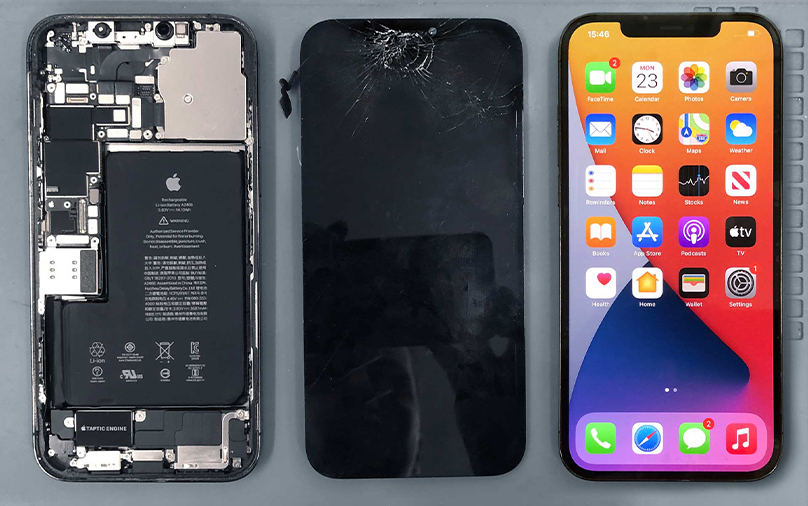
iPhone 12 Pro screen replacement Steps
Accidents happen, and a cracked screen on your iPhone 12 Pro can be frustrating — but the good news is that it can be replaced. The process involves carefully removing the two bottom screws near the charging port, gently lifting the broken display using special suction and prying tools, and disconnecting the display cables from the logic board. Once the old screen is removed, a new genuine or high-quality replacement screen must be connected, secured, and reassembled with precision. Because the iPhone 12 Pro is tightly sealed and built with advanced Face ID sensors, attempting this repair without proper tools or experience can lead to further damage. For the safest results, it’s highly recommended to have your screen replaced by a certified technician or trusted repair service to ensure your iPhone works like new again.
You can have your iPhone. Through Installment Delivered next day.
On order over R1000
Free– spend over R3500
We offer competitive prices
We guarantee our products
Steps for Replacement:
-
Power Off Your iPhone
– Hold the side button and volume button, then slide to power off. -
Remove the Bottom Screws
– Use a Pentalobe screwdriver to remove the two screws located next to the charging port. -
Loosen the Screen
– Apply a suction cup near the bottom edge of the screen.
– Use a prying tool to gently separate the screen from the frame (be careful not to damage the waterproof adhesive). -
Lift the Screen Carefully
– Open the phone from the left side, like opening a book.
– Be cautious: ribbon cables are still connected inside. -
Disconnect the Battery
– Remove the shield over the connectors and disconnect the battery first (to avoid short circuits). -
Disconnect Display Cables
– Gently unplug the front sensor and display flex cables from the logic board.
– Now the old screen is free to remove. -
Install the New Screen
– Connect the new screen’s cables to the logic board.
– Reconnect the battery and secure the connector shield. -
Test Before Closing
– Power on the phone to check that the new display, touch, and Face ID are working correctly. -
Seal the iPhone
– Align the new screen, press it back into the frame, and secure it with the two bottom screws.
Add a review
Your email address will not be published. Required fields are marked *